2026.09.24
Put a Pin In It
I’ve spent hundreds of hours creating the fragments or levels of Found. I’ve spent hundreds more playing through them. It’s fair to say that I know them pretty well, and this knowledge gives me a unique experience. But now I have playtesters who didn’t create the game, which brings new perspectives. As a game designer, this moment is both terrifying and exciting. What if they love it? What if they hate it? What if they find it boring? What if they find it hard to use? In almost all cases, these inputs are useful.
In this case, a playtester provided the feedback that they were frustrated with the map. They wanted it to do more. They didn’t just want to know the passages of a fragment; they wanted a way to know where they’d been and to catalog what they’d seen.
The map is a big part of Found, so it’s no surprise that I’ve considered most features (some that this particular playtester might enjoy, but that they need to work to unlock). The challenge is in choosing which ones promote discovery and exploration while not giving too much away. The solution I settled on was pins. Why? Because pins allow the player to decide what’s important to them. It might be the location of an enemy, an NPC, an unreachable chest, or a place to sleep and recover for the night.
But planning for pins and executing them were two different things. The map interface is already doing more than your average video game map, and so I had to move forward considering far more than the new feature.
Knowing the System
The map does a lot of things. There’s the typical panning and zooming. Then there’s tile placement. There are two other unlockable features I won’t spoil here, but they each got a controller button. That’s a lot of verbs. And with the introduction of mouse control, not all of them were being done well.
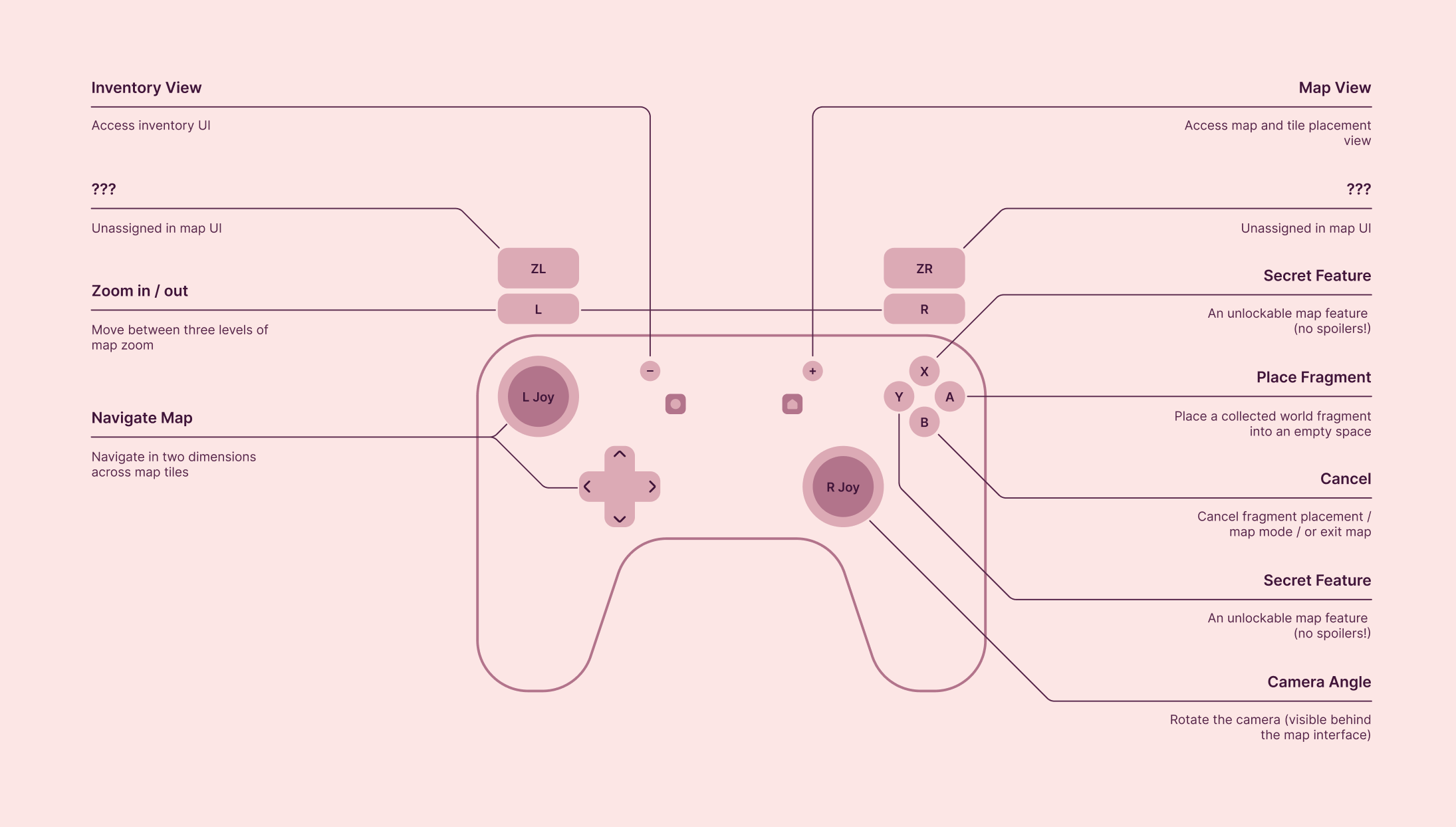
So the first step was to do a cleanup: fixing accessibility issues, tuning zooming and panning, and committing to specific verbs being tied to specific actions, gestures, or buttons on a controller with limited assignability.
Pins wasn’t as simple as adding a new feature on top of everything else. It meant that everything else needed to be considered and often refined or redesigned to make sure it all made sense. Unsurprisingly, getting everything tidied and tuned was most of the work of adding pins to the map.
Prototyping Everything
Finally, the foundation was in place, and I was ready to start adding pins to the map. I had a static mockup that looked great. I brought this into implementation with an idea in my head of how it should behave. Then another classic design lesson manifested: prototyping is believing.
The player navigates the map in pin mode. They select a position on the map to place a pin, and what happens? A row of icons appears, with the last-used icon selected and centered in the list. But what if the player was trying to place something on the edge of the map? Or what if the player was playing with a pointer instead of selection-based input? These aren’t edge cases, they just require more thinking than a single mockup can provide.
There’s always tension between design and development, even when they reside in the same brain. Sometimes I find my inner developer taking over too quickly from my inner designer. Other times I find myself taking too long with design, making my developer brain impatient. This was one of those cases where both parts of my brain could work together. Design hypothesized. Development built and broke each hypothesis until we found one that worked.
Never Settling
My first attempt put the selected icon right on the spot, so the choice would double as the preview. This was an elegant solution until you tried to place a pin on the edge of the map.
My second attempt slid the map so the spot was centered, then opened the pin selector in the middle where there was room. But the movement of the map lost the sense of place, and, even as the creator of the UI, I didn’t feel confident that the new centering matched my intended pin location.
Making things even worse, in both cases, trying to navigate a pin selection designed for a controller by moving a mouse left and right resulted in uncontrolled scrolling, and possible selection limited to either the first or last pin in the list. I needed to give up on my initial dream of having the selected pin glyph anchored to the press/click location with the options scrolling into place.
So I moved to an interface more akin to a speech bubble, where the tail indicated the pin’s placement and the UI on top could slide left and right for a controller or could handle pointing and clicking with the mouse. Finally, something that felt right!
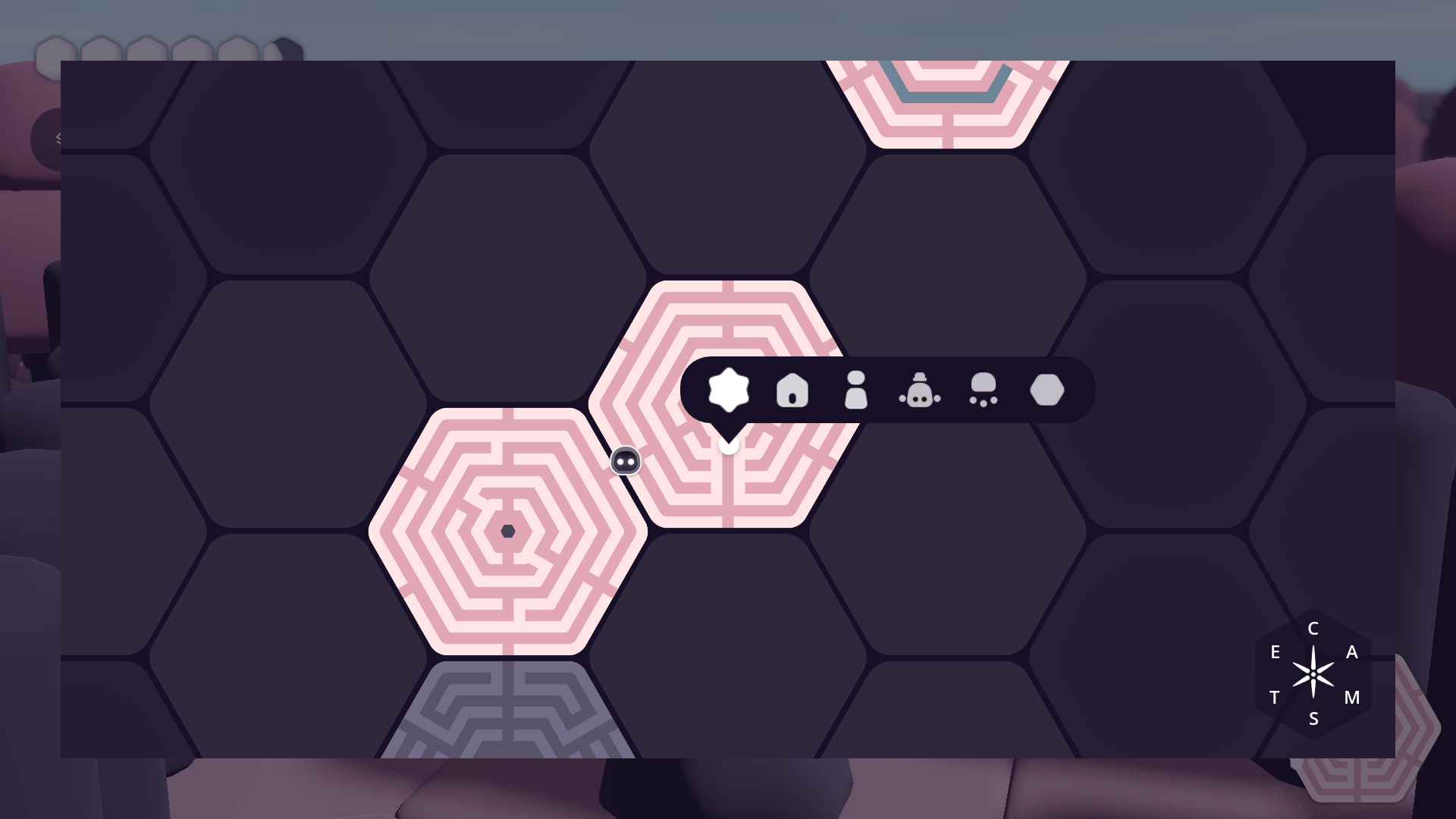
So that’s what shipped with the second playtest build. I still have plenty of concerns about discoverability or the fact that pin placement is limited to 100. But what’s most important is that people are playing it, testing it, and giving me feedback. And that I am continuing to listen and learn.